addQuickText
Purpose: Adds user defined QuickTexts for use with echo.
Syntax: addQuickText string value
string: A string with the characters to be replaced.
value: The value to replace the string.
Example:
# Remove any existing texts
clearQuickText

# Cyan on Black
addQuickText "~&" "^[0m^[1;36m"

# Green on Cyan
addQuickText "~*" "^[0m^[32m^[46m"

# String commonly used in menus
addQuickText "~(" "-=-=-=-=-=-"

# echo using QuickText
echo "~&~(~* Main Menu ~&~(~0"

# The following string is actually sent to all clients
# "^[0m^[1;36m-=-=-=-=-=-^[0m^[32m^[46m  Main Menu ^[0m^[1;36m-=-=-=-=-=-^[0m"
Notes: You can not use QuickTexts outside of a string. TWX treats then a system variables and converts them to uppercase. Future versions of TWX may throw a compiler error if a QuickText is used outside of a string.
Use Double Tilde (~~) if you need a literal Tilde (~) in your string.
Dark/Normal White is sometimes referred to as Grey, and Bright Black is sometimes referred to as Dark Grey.
Add as many QuickTexts as you like. User QuickTexts override builtin-in QuickTexts, so you can even re-define existing colors. Use clearQuickText to remove any esisting user quick texts.
The following letters and symbols are available for QuickTexts without interfering with predefined values: qrtvwxyzQRSTUVWXYZ~`#$%^&()_-+={}|[]:";'<>?,./
The QuickText string parameter does NOT have to begin with a Tilde (~) character. You could do 'addQuickText "Dog" "Cat"' and from then on, Echo "Dog" would actually echo "Cat" to all clients. Be careful though as these strings are global in nature and remain in effect even after your script ends. QuickTexts effect strings sent from any running scripts, TWX System/Menus/etc.. and even TWGS/TradeWars game output too. This is kind of an unintended side effect, but if you want "Captain Zyrain" to be "Admiral Zyrain", then you can do it with a QuickText.
Dark/Normal ANSI colors
| Color | ANSI | TWX | TW2002 |
|---|---|---|---|
| Black | ^[30m | ANSI_0 | ~a |
| Red | ^[31m | ANSI_4 | ~b |
| Green | ^[32m | ANSI_2 | ~c |
| Yellow | ^[33m | ANSI_6 | ~d |
| Blue | ^[34m | ANSI_1 | ~e |
| Magenta | ^[35m | ANSI_5 | ~f |
| Cyan | ^[36m | ANSI_3 | ~g |
| White (aka Light Grey) | ^[37m | ANSI_7 | ~h |
Bright ANSI colors
| Color | ANSI | TWX | TW2002 |
|---|---|---|---|
| Black (aka Dark Grey) | ^[1;30m | ANSI_8 | ~A |
| Red | ^[1;31m | ANSI_12 | ~B |
| Green | ^[1;32m | ANSI_10 | ~C |
| Yellow | ^[1;33m | ANSI_14 | ~D |
| Blue | ^[1;34m | ANSI_9 | ~E |
| Magenta | ^[1;35m | ANSI_13 | ~F |
| Cyan | ^[1;36m | ANSI_11 | ~G |
| White (not Grey) | ^[1;37m | ANSI_15 | ~H |
background ANSI colors
| Color | ANSI | TW2002 |
|---|---|---|
| Black | ^[40m | ~i |
| Red | ^[41m | ~j |
| Green | ^[42m | ~k |
| Yellow | ^[43m | ~l |
| Blue | ^[44m | ~m |
| Magenta | ^[45m | ~n |
| Cyan | ^[46m | ~o |
| White (Grey) | ^[47m | ~p |
Blinking ANSI colors
| Color | ANSI | TW2002 |
|---|---|---|
| Black | ^[5;40m | ~I |
| Red | ^[5;41m | ~J |
| Green | ^[5;42m | ~K |
| Yellow | ^[5;43m | ~L |
| Blue | ^[5;44m | ~M |
| Magenta | ^[5;45m | ~N |
| Cyan | ^[5;46m | ~O |
| White (Grey) | ^[5;47m | ~P |
These also set the BACKGROUND color, so AM would be Blinking Bright Red on Blue.
Additional ANSI colors and combinations used in TW2002 menus
| TW2002 | Color | ANSI |
|---|---|---|
| ~! | Clear Screen | ^[2J^[H |
| ~@ | Clear Current Line | \r^[0m^[1K |
| ~s | Save Current Cursor Position | ^[s |
| ~u | Restore Saved Cursor Position | ^[u |
| ~0 | Reset | ^[0m |
| ~1 | Cyan on Black | ^[0m^[1;36m |
| ~2 | Yellow on Black | ^[0m^[1;33m |
| ~3 | Magenta on Black | ^[0m^[35m |
| ~4 | Bright White on Blue | ^[0m^[1;37;44m |
| ~5 | Green on Black | ^[0m^[32m |
| ~6 | Blinking Bright White | ^[0m^[1;5;37m |
| ~7 | White on Black | ^[0m^[1;37m |
| ~8 | Blinking Bright Red | ^[0m^[1;5;31m |
| ~9 | Black on White | ^[0m^[30;47m |
Trivia
Why are Xide's color codes in the wrong order?
Shouldn't ANSI_1 be RED?
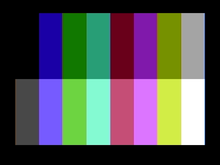
Maybe you have seen this image before?
Xide mapped the IBM/CGA color codes to ANSI.
Maybe he should have used CGA_1 = BLUE?