writeEx
Purpose: Appends a line of text to a text file. Syntax: writeEx {file} {[value] values...}
{file}: The name of a text file to append a line to.
{[value] values...}: A series of values containing the text to be written.
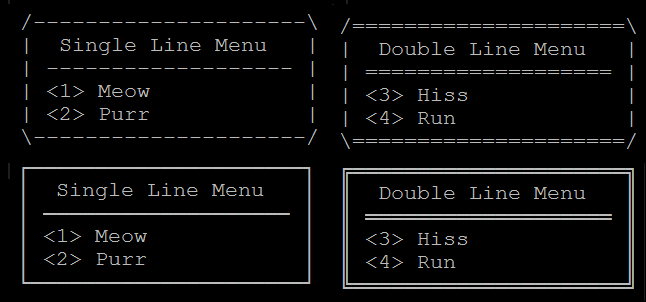
Notes: This command can be used to store a line of text at the end of a file. If the file does not exist, it is created. WriteEx will convert ascii menu boxes to CP437 drawing chars.
Example:
$msg := "*/---------------------\*"
$msg &= "|  Single Line Menu   |*"
$msg &= "| ------------------- |*"
$msg &= "| <1> Meow            |*"
$msg &= "| <2> Purr            |*"
$msg &= "\---------------------/**"
writeEx $msg

$msg := "*/=====================\*"
$msg &= "|  Double Line Menu   |*"
$msg &= "| =================== |*"
$msg &= "| <3> Hiss            |*"
$msg &= "| <4> Run             |*"
$msg &= "\=====================/**"
#writeEx $msg